
Driveway Square Footage Calculator
Measure any driveway from satellite — straight, curved, circular, or multi-section — without a tape measure or site visit.
Driveway square footage is length × width in feet: a two-car driveway 20 ft wide and 20 ft deep is 400 sq ft, and most residential driveways fall between 200 and 1,000 sq ft. For a curved or irregular driveway, SurfaceMeasure measures it from satellite: pull up the address, trace the outline, and read the square footage before you leave the office.
Card required · Cancel anytime
Enter Your Driveway Dimensions
Know the dimensions? Enter them below for instant square footage — free, no sign-up. Add a section for an apron, a widened garage pad, or a second parking area.
Driveway section
Total area
0sq ft
0 sq yd
0.000 acres
Length × width only works on straight, rectangular sections. For curves, freeform shapes, or edges you can't easily reach with a tape, trace the real shape on satellite imagery and let the area calculate itself.
How to Calculate Driveway Square Footage
Driveway square footage is length × width in feet. A 20 ft wide by 40 ft deep driveway is 800 square feet. The only complication is that most driveways aren't a single clean rectangle, so you break the shape into parts, measure each one, and add the results.
To convert once you have the total: divide square feet by 9 for square yards (how asphalt and sealcoat are often priced), or by 43,560 for acres. Sealcoat rates by the square foot are in sealcoating cost per square foot. The driveway calculator on this page returns both automatically.
Measuring on site with a tape or wheel instead? Our step-by-step guide to measuring a driveway walks through where to start and end each measurement, and the mistakes that throw a number off.
How Big Is a Typical Driveway?
Most residential driveways fall between 200 and 1,000 square feet. Use these as a sanity check on a number you just calculated — not as a substitute for measuring the actual property.
| Driveway | Typical size | Approx. area |
|---|---|---|
| Single-car, one car deep10 × 20 ft | 10 × 20 ft | 200 sq ft |
| Single-car, two cars deep10 × 40 ft | 10 × 40 ft | 400 sq ft |
| Two-car, one car deep20 × 20 ft | 20 × 20 ft | 400 sq ft |
| Two-car, two cars deep20 × 40 ft | 20 × 40 ft | 800 sq ft |
| Long drive to detached garage10 × 60–100 ft | 10 × 60–100 ft | 600–1,000 sq ft |
| Circular turnaroundvaries | varies | 800–1,500 sq ft |
Widths assume roughly 9–10 ft per car and 18–20 ft of depth per car length. Lot shape, setbacks, and turnarounds move these numbers substantially.
Curved Driveway? Measure It From Satellite
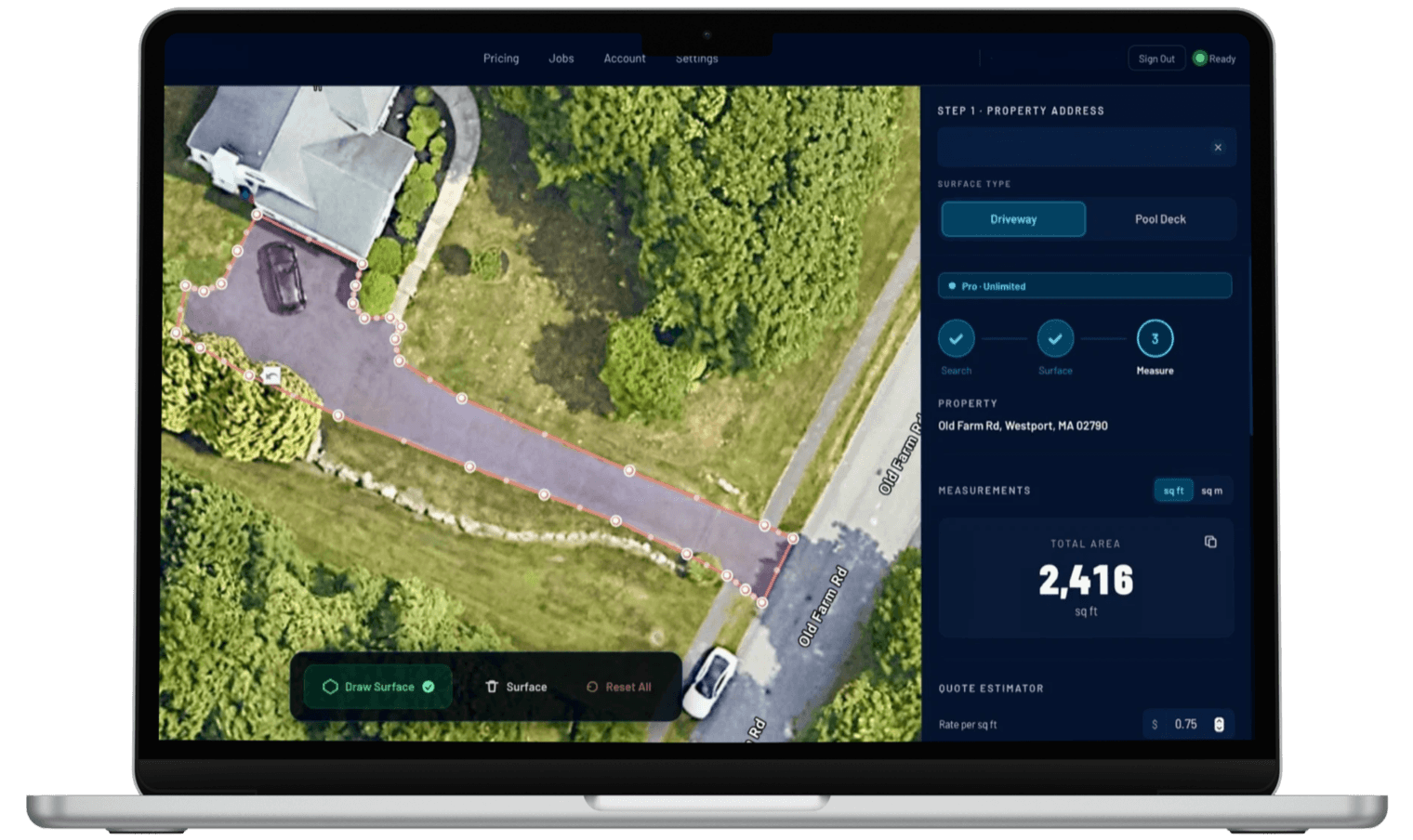
When length × width won't do it — curves, circular turnarounds, or a driveway you can't walk — trace the real outline instead.
Search the Property Address
Type in any residential or commercial address. The satellite view loads instantly, giving you a clear overhead view of the driveway and surrounding property.
Trace the Driveway Shape
Use the polygon drawing tool to click around the driveway outline. Works on straight driveways, curved approaches, circular turnarounds, aprons, and multi-section layouts.
Get Instant Square Footage
SurfaceMeasure calculates the enclosed area automatically. You'll see the square footage immediately. Save the project, export the measurement, and move on to the next job.
The Faster Way to Quote Driveway Work
For sealcoating contractors, paving companies, and concrete pros, the traditional measurement process means driving to the property, walking the driveway, measuring width and length with a tape or wheel, sketching out irregular sections by hand, and doing the math on the way back. On a full day of estimating, that adds up fast — sometimes five or six site visits just to get numbers for quotes that might not even close.
SurfaceMeasure turns that into a browser tab. You search the address, trace the driveway shape on the satellite image, and have the square footage while the customer is still on the phone. You're writing the estimate before the competition has even left their shop.
The tool handles any shape — straight approaches, curved driveways, circular turnarounds, U-shaped layouts, and driveways with separate apron sections. You don't need a perfect rectangle to get a useful number.
Every Driveway Configuration, Measured Accurately
Straight, curved, commercial, or multi-unit — trace any shape with satellite precision.
Straight Residential Driveways
The standard single-car or double-wide driveway. Trace the outline in seconds and get square footage instantly.
Curved and Sweeping Driveways
Place polygon points along the curve to follow the exact shape. Works for gentle bends and dramatic sweeping approaches alike.
Circular and Turnaround Driveways
Round driveways, loop driveways, and circular turnarounds. Trace the shape with enough points to capture the curve accurately.
Multi-Section Driveways
Driveways with a separate apron, widened sections near the garage, or branch paths. Measure each section separately and add them together.
Commercial Parking Lots and Approaches
Large paved surfaces, entry drives, and commercial parking areas. SurfaceMeasure works at any scale — residential or commercial.
HOA and Multi-Unit Properties
Measure driveways across an entire HOA or apartment complex. Save each property as a separate project and export measurements in bulk.
For pressure washing contractors
Quoting driveway pressure washing jobs?
Measure the driveway here, then turn that square footage into a priced quote — apply your rate per square foot, add a minimum, and send it the same day.
Driveway Square Footage — Common Questions
Everything contractors need to know about remote driveway measurement.
For a rectangular driveway, you multiply length by width. For anything irregular — curved, L-shaped, or multi-section — you need to break it into segments and add them together. SurfaceMeasure skips the manual math entirely: you trace the shape on a satellite image and the area is calculated automatically, regardless of how complex the driveway is.
A single-car driveway one car length deep is roughly 10 × 20 ft, or about 200 sq ft. A standard two-car driveway is around 20 × 20 ft (400 sq ft), and a two-car driveway two car lengths deep runs about 20 × 40 ft, or 800 sq ft. Long driveways to a detached garage often land between 600 and 1,200 sq ft, and circular turnarounds typically fall between 800 and 1,500 sq ft. These are common ranges, not rules — driveway sizes vary a lot by lot shape and setback, so measure before you quote.
A driveway one car deep is about 18–20 ft long, and one two cars deep is about 36–40 ft. A drive back to a detached garage commonly runs 60–100 ft. Width follows the number of cars side by side, at roughly 9–10 ft per car, so a two-car driveway is 18–20 ft wide. Setbacks and lot shape move all of these, so treat them as a sanity check and measure the real driveway before you quote it.
Yes. For a rectangular driveway, enter its length and width in the calculator on this page. For a curved, circular or multi-section driveway, search the address in SurfaceMeasure, trace the driveway's edge on the satellite image, and the enclosed square footage comes back directly, typically within 1–3% of a tape measurement when the edge is not hidden by trees or a parked car. Neither needs a tape measure or a trip to the property.
Yes. The polygon drawing tool works by placing points anywhere on the satellite image, so you can follow curves, angles, and irregular edges with as much precision as you need. The more points you place along a curve, the more accurately the shape is traced. Curved and L-shaped driveways are exactly where tracing beats manual math: a tape measurement has to approximate a curve as a series of rectangles, while a traced polygon follows the real edge. For a long sweeping curve, eight to twelve points is usually enough to get within a square foot or two of the true area.
For most driveways, satellite-based measurement lands within 1–3% of an in-person tape measurement — accurate enough for material estimation, quoting, and job planning. The dollar impact is smaller than it sounds: even a worst-case 3% error on a 2,000 sq ft driveway priced at $0.15 per square foot moves the quote by about $9. Factors like image resolution and the angle of satellite capture can introduce minor variation, but in practice, SurfaceMeasure measurements are consistently close enough for professional estimates — and far closer than eyeballing, which commonly misses by 20% or more.
Yes. After the first shape, tap + Section on the map toolbar to add another to the same measurement — useful for driveways with a separate apron, a widened garage pad, or split sections. Each section is measured on its own and can be named, so you see the breakdown and the running total. The apron is the section worth splitting out most often: the flare where the driveway meets the street typically adds 150–400 sq ft, and because it collects the most road grime it is often priced as its own line item on cleaning and sealing quotes.
Yes. The tool works at any scale. Commercial entry drives, parking lot approaches, large paved surfaces, and multi-unit property driveways can all be measured the same way as a residential driveway — just with more polygon points.
No. SurfaceMeasure uses satellite imagery, so as long as the property is visible from above (which covers virtually all addresses in the U.S.), you can measure it without leaving your desk. Many contractors use it to measure properties before deciding whether a physical visit is necessary.
New accounts start with a 7-day free trial of Pro: a card is required, nothing is charged today, and nothing at all if you cancel before the trial ends. After that it is $29.99 a month, or $299 a year (the yearly plan has no trial). The annual plan works out to two months free. For contractors doing regular estimates the math is short: if skipping one drive-out saves you half an hour and a gallon of fuel, the tool has paid for its month on the first quote. There is no per-seat pricing or measurement quota on paid plans — unlimited measurements, saved history, and PDF quotes are included.
Related Resources
Guides and tools to support the full measurement workflow.
Measure Any Driveway From Your Desk
Search an address, trace the driveway, and have the square footage right now. Card required, cancel anytime.
Also measuring pool decks?
Pool Deck Square Footage Calculator →